
Class Project: Sprint Workflow
An overview picture of the workflow for a class project is:
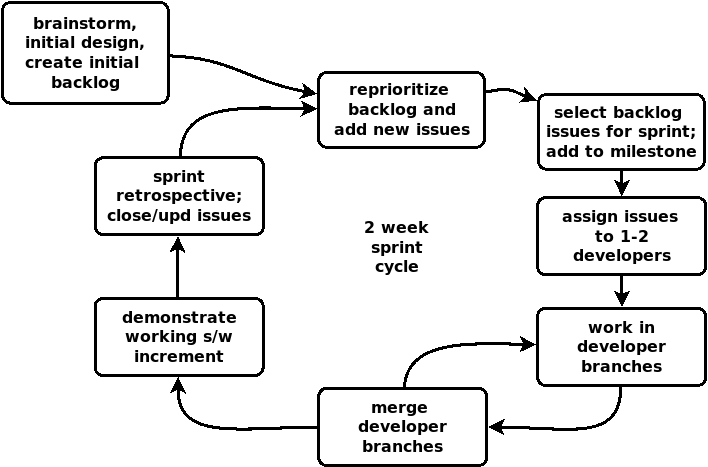
During each project iteration (sprint), the team will work on making progress on their project and all of its associated parts (coding, documentation, etc.). This page has more detail about using specific GitHub capabilities.
Initial Kickoff: Brainstorming
The team must flesh out their idea and brainstorm further details of what they want to do. A very good idea is to specify a Minimum Viable Product (MVP). Indeed in a class project, an MVP is probably the end-of-semester target.
An initial system architecture (design) needs to be developed. A good experienced architect is critical here for a real product, but for a small class project not necessary. This is a high level, overall architecture that will guide system development.
At this point, an initial product backlog of work items can be created. Each work item is captured in a GitHub issue.
Sprint Steps 1+2: Reprioritize and Select Sprint Backlog
Sprint planning can be more involved for real teams, but class projects are pretty small projects. Teams should look at the product backlog (GitHub issues), reprioritize if needed, add new issues if needed, and select the ones to work on for this sprint (sprint backlog). In GitHub, if a milestone does not yet exist for this sprint, create one, and then assign the selected issues to this sprint milestone.
Issues (work items) should be completeable in one sprint. Generic long-running items like “Work on GUI” or “Write documentation” are bad and should never be created.
Sprint Step 3: Assign Work to Team Members
The selected sprint work (issues) should be assigned to team members. No more than two team members should be assigned to any item, and one is better. A big mistake that teams make is to assign everyone to every issue. This never works well. A classic saying is: if everyone is responsible for something, then no one is. Individual team members should know what they are responsible for. For issues with two team members assigned, one person should know that they are the lead.
Every team member must have assigned work. If your team is being disfunctional and you do not have assigned work, then create some issues and assign them to yourself.
Sprint Steps 4+5: Do the Work
Each developer should have their own Git branch to work in. This branch should be created in GitHub, and then pulled into each developer’s local repo. It is possible to create local branches but I recommend against it, unless you really know what you are doing with Git.
When working in branches, a good practice is to merge early and often. The longer merging is put off, the worse it will be. When you (a developer) completes a chunk of code that works and will not break the main product, then create a merge request to merge it into the main product, and perform the merge. Also you should be regularly merging the main product branch back into your developer branch, so that you are always working on the latest code. Teams that wait to merge until the night before demo day are usually in trouble!
The main product branch should always have a working product, so do not merge partially completed code that will break the product.
Sprint Step 6: Demonstrate your Work
Sprints always end with a real demonstration of a real working product. No one should ever just claim that some feature “is 90% done” or anything like that. Working software is all that counts in agile development.
Sprint Step 7: Retrospective and Wrap-Up
The team should come together to wrap up the sprint. A concrete task at this point is to close any issues that have been completed, and update issues that need changed. New issues could also be added at this point. A more abstract task is to simply talk about the sprint, what went well and what did not, and what you want to try to do better or change for the next sprint.
After this, it’s back to Step 1!
Older content is below here, but still good ideas.
The following set of rules must be adhered to for project work. Sprint evaluation and grading will involve checking for these.
-
The Sprints Page in your GitHub wiki must be updated. This would be best done immediately after the demos in lab. Follow the page description on GitHub wiki pages. In particular, create content for the sprint velocity, team performance and sprint reflection on the past sprint; and then edit the goals and scrum master for the current (new) sprint.
-
You must create/edit your GitHub issues at the beginning of the new sprint. Then you must select issues to work on for this sprint by assigning the milestone “Sprint#” to them (whatever the sprint number is). Issues that had the previous sprint’s milestone associated with them but were not closed should have their milestone tag removed and either left blank or have this sprint’s milestone added (if you intend to work on the issue). All selected issues must be assigned to one or two team members. Optional: If you are using the project work board, issues with this sprint’s milestone tag can be added to the Work Project “To Do” board.
-
Team members should not be doing any work that is not associated with at least one GitHub issue (thus, you should have issues even for documentation and other tasks). If you are about to do work that cannot be associated with any existing issue, then create one and assign yourself! Optional: If you are using the project work board, each issue must be moved to the project board’s “Doing” and “Done” columns as it proceeds.
-
Beginning in Sprint 2, all work must be done in a Git branch that is created either: a) for the team member’s project work (recommended); b) for the team member’s work for that sprint; or c) for work on a particular issue. See my page on branching for more detail.
-
Before the end of a sprint, all work branches must be merged into the main branch by using pull requests. You probably will be using pull requests to also merge work pushed to the main branch back into your development branch.
-
All commits must have at least one issue number (as a hashtag) in its commit message. (Note: I have never been able to get students to embrace this)
-
After merging, the team should review the work that was done, and should close any issues that have been completed. You should not have long-running generic issues, such as “Work on documentation” that you never close; rather, you should have specific issues, such as “Create domain model and integrate into Wiki” and then when they are done you should close them.