
Computational Thinking: Algorithms
This page builds on our introduction to computational thinking. Recall our five foundations of computational thinking:
Algorithms
We put this foundation last, but in some sense to is the basic foundation that we cannot live without! It perhaps is the one foundation to rule them all. The others are important, but the heart of using computers is computation, and algorithms make computation happen.
Humans have been using algorithms, or a set of instructions, for basically ever. A recipe is an algorithm. A step-by-step guide to fixing something or putting together some furniture are algorithms. However, they are usually very simple algorithms, being only a sequence of steps for one particular thing. In computer science we often create very intricate algorithms for very hard problems!
Unambiguous and Specific: Flow Charts
Wikipedia:Algorithm says “An algorithm is an unambiguous method of solving a specific problem.”
We solve problems every day, but how often do we stop and try to write down an unambiguous method to solve each one? Stopping to think about, and then write down, that method is the fundamental goal of algorithmic thinking.
For beginners, one good way to avoid ambiguous descriptions is with flow charts. The pieces of basic flow charts are:
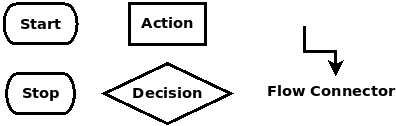
We use these to create a graphical depiction of our algorithm, and because we agree on what the diagram means, then it is unambiguous! Below is a flowchart for buying a book on the spur of the moment (books are great to buy anytime!):
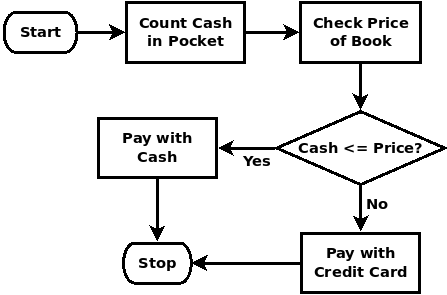
This diagram is much less ambiguous than if we just talked about it. In fact, if you look closely at it, there are parts you might disagree with!
Flows For If-Then-Else and the While Loop
Below are flow chart segments for the operation of an if-then-else choice and a while loop.
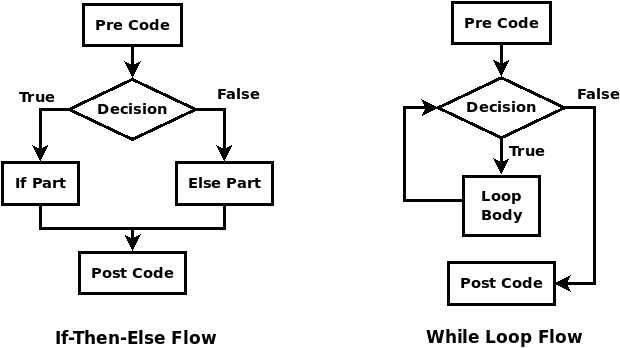
The if-then-else is a conditional choice that the algorithm flows through once, and follows either the if-part path or the else-part path. The while loop checks its condition before each repetition (or iteration) of the loop body; if the condition is true then flow goes through the loop body and back up to the condition; when the condition is false, the loop stops and flow goes down to the rest of the algorithm.
Computational Exactness: More Math!
Wikipedia also goes further in describing algorithms: “In mathematics and computer science, an algorithm is a finite sequence of mathematically rigorous instructions, typically used to solve a class of specific problems or to perform a computation.”
In computer science, we want to specify algorithms in a way that computers can perform them. To do this, we must be exact! In the book-buying example above, our decision point uses “>=” as a comparison, which in computer science means “greater than or equal”. This is a very exact comparison – by putting it in our flowchart we are purposely saying, “if we have to spend exactly all of our cash for this book, we will.”
Even though sometimes programming may not look like it, the things we write in our code are very exact mathematical statements, and we need to know what they mean!
Sorting, Searching, Time, and Space
While algorithmic ideas are ubiquitous, when we have collections of data, we really must be careful about the algorithms we choose or create to process that data. Beginning computer science studies focus on activities like sorting data and searching data, but there are many other, and more complex, operations that we often want to do in our computations, and this is where knowing and studying concepts in algorithms becomes crucial.
Two big questions we like to ask are: 1) How much time does an algorithm take? (time complexity) and 2) How much space (memory) does an algorithm take? (space complexity)
These questions are generally asked in relation to the amount of data they need to process. How long will our sorting algorithm take to sort 100 items? 1000? A billion?
Some algorithms have variations based on the data itself, so we might ask: How long on average will our algorithm take on a billion items? How long in the worst case might our algorithm take? (see here)
Many great people have worked extremely hard to devise incredibly efficient algorithms to deal with complex problems!
Naming, Abstraction, and Decomposition
In programming, we typically create an algorithm as a named function. As we see over and over, naming something – in this case an algorithm – is an important part of computational thinking.
For example, many sorting algorithms have been created, including BubbleSort, QuickSort, MergeSort, and InsertionSort. The name is an abstraction that captures some aspect of what that algorithm does.
Sometimes algorithms for well-known problems do not need named for the problem but are named after the people who created it. The RSA public-key encryption algorithm is named after the three people who invented it: Rivest, Shamir, and Adleman. The zip file compression tool uses algorithms that are based on the LZ compression algorithm, named after its creators, Lempel and Ziv.
If an algorithm is complicated enough, it is good to decompose it into parts, with each part being its own named function. For example, QuickSort uses a helper function named Partition to solve one piece of its operation.
Exercises
-
Pick an activity in the real world that you want to automate (or better understand), or an activity that your software needs to do.
-
Create a flow chart that correctly captures that activity. While creating this you will probably need to think hard, and ask and answer clarification questions – that’s the whole purpose of the exercise!
-
Name your algorithm. Then code it as a named function or method in your program!